What the interface is actually doing for the business
Benefits of a Touchscreen Pizza Vending Machine
The touchscreen on a pizza vending machine isn’t just a way to place an order — it’s the entire customer experience, the compliance display, and one of the few parts of the machine an operator can update without a technician. This guide explains the pizza vending machine touchscreen interface and why it directly affects order accuracy, average spend, accessibility and how easily the operator can run the business day to day.
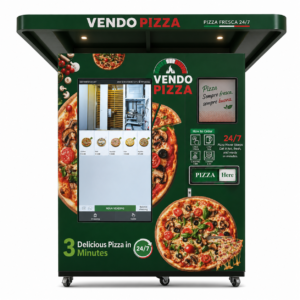
What’s the main benefit of a touchscreen pizza vending machine?
A touchscreen interface removes the guesswork from an unattended sale — the customer sees exactly what they’re ordering, what it costs, and what’s in it, while the operator gets a channel to change prices, menus and promotions without touching the machine’s hardware. That combination of clarity for the customer and control for the operator is what separates a modern touchscreen system from older button-and-coin vending formats.
Six things a good interface changes
Six Operator Benefits of a Touchscreen Interface
A touchscreen does more than take an order. Each of the points below affects either how much a customer spends, how few mistakes happen, or how easily the operator can run the machine day to day.
Fewer order errors
A visual menu with clear product images and options removes the ambiguity of a numbered keypad or a verbal order.
Higher average order value
Add-ons, combos and visible pricing tiers are easier to present — and easier for the customer to say yes to — on a screen than on a button panel.
Faster transactions
A well-laid-out touch interface moves a customer from browsing to paying faster than scrolling through a numeric code list.
Promotional space
The same screen that takes the order can also display offers, seasonal items or loyalty messaging while the pizza cooks.
Brand consistency
A digital interface can match the operator’s branding and be updated without printing new signage or stickers.
Data on what sells
Digital ordering naturally logs which products, times and combinations perform best, informing future menu decisions.
Where mistakes used to happen
Order Accuracy and Upsell Opportunity
Older vending formats — a numbered keypad, a simple button grid — rely on the customer already knowing what number corresponds to what product. A touchscreen shows the actual product, its price and its options before the customer commits, which cuts down on the wrong-item selections that create refund requests and wasted stock in an unattended format.
The same screen is also where upselling naturally happens: a suggested drink, a larger size, or a second pizza at a bundled price can be presented as a simple tap rather than requiring the customer to ask — something no coin-operated or button-based machine can do.
A regulatory job, not just a sales one
Allergen and Compliance Display
In an unattended format, the touchscreen is also where the operator meets food-information obligations. EU rules require allergen information to be available to the customer before purchase — for a vending machine with no staff member to ask, that means the screen itself has to carry it, either directly on the product listing or through a clearly signposted reference.
Changing the menu without opening the machine
Remote Menu and Price Control
A digital menu pizza vending machine gives the operator a level of control a fixed button panel simply can’t match: pricing, product listings and promotions can typically be updated remotely through the machine’s management platform, rather than requiring a technician visit. That matters operationally — a seasonal price change, a temporary out-of-stock flag, or a new combo offer can go live across one machine or an entire fleet without physical access to the unit.
| Task | Touchscreen system | Fixed button/keypad system |
|---|---|---|
| Change a price | Updated remotely through the platform | Requires reprogramming or physical relabelling |
| Add a new product | Added to the digital menu directly | May require new signage or button remapping |
| Mark an item out of stock | Flagged instantly on screen | Customer may select it anyway |
| Run a promotion | Displayed on the ordering screen | Needs separate physical signage |
Reaching more customers
Accessibility and Language Options
A digital interface can offer multiple languages on the same screen — genuinely useful at motorway service areas, tourist sites and transport hubs with an international customer base — along with larger text, high-contrast modes and clearer visual cues than a fixed physical panel can provide.
What actually changed
Touchscreen vs. Older Vending Formats
Traditional vending — coin slots, numbered buttons, printed product codes — was built for shelf-stable snacks and drinks, not a cooked-to-order product with variable pricing, allergen information and promotional content. A touchscreen is what makes an automated pizza machine workable as a full point of sale rather than a simple dispenser.
Common questions from operators
Touchscreen Pizza Vending Machine FAQ
What size touchscreen do pizza vending machines use?
Vendo Pizza’s commercial range uses a 55-inch touchscreen as standard across its Fresh and Frozen models.
Can I change prices on the touchscreen remotely?
On a connected system, pricing and menu content can typically be updated through the machine’s management platform without a technician visit. Confirm exactly what your specific system supports.
Does the touchscreen show allergen information?
It should. EU food information rules require allergen information to be available before purchase, and for an unattended machine that means displaying it on or near the ordering screen.
Can the touchscreen support multiple languages?
Many digital interfaces support multiple languages, which is particularly useful at international or tourist-facing sites. Confirm which languages are available by default versus custom-configured.
Does a touchscreen increase average order value?
A well-designed visual menu makes it easier to present add-ons, combos and upgrades than a fixed keypad, which can support higher average order values, though results depend on menu design and site traffic.
What happens if the touchscreen fails?
Response depends on the machine and its fault-handling logic — a failure may disable ordering entirely or trigger a remote alert to the operator. Ask your manufacturer what happens specifically on their system.
See the Touchscreen on Every Vendo Pizza Model
Every Fresh and Frozen model in the range uses the same 55-inch touchscreen ordering system. Compare capacities and pricing before you request a quotation.